The Silent SEO Killer: Why Missing Canonical Tags Are Hurting Your Website’s Performance
In the complex world of search engine optimization, seemingly small details can have a monumental impact. One such detail, often overlooked but critically important, is the proper implementation of canonical tags. If your website lacks these essential directives, especially for pages with URL parameters, pagination, or multiple versions of similar content, you’re not just missing an opportunity – you’re actively undermining your SEO efforts and potentially incurring penalties.
What Exactly Are Canonical Tags and Why Are They So Crucial?

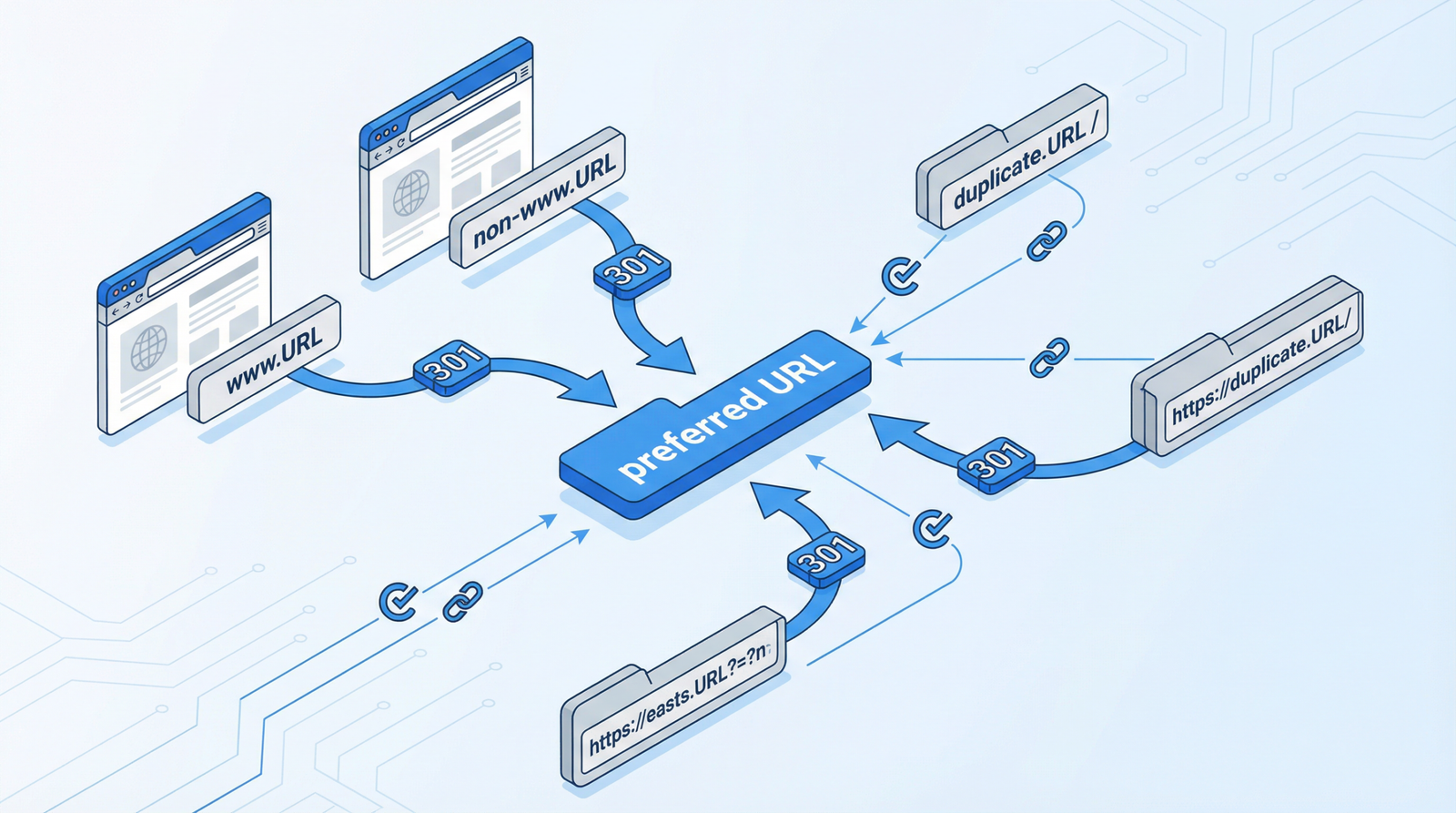
A canonical tag (<link rel="canonical" href="...">) is an HTML element that helps webmasters prevent duplicate content issues by specifying the “canonical” or “preferred” version of a web page. In essence, it tells search engines which URL is the master copy of a page, consolidating ranking signals and ensuring that only the most authoritative version is indexed.
Without proper canonicalization, search engines like Google may encounter multiple URLs pointing to identical or very similar content. This can lead to several severe problems:
- SEO Authority Dilution: When search engines find duplicate content, they may split ranking signals (like backlinks and relevance) across all versions, weakening the authority of your preferred page.
- Wasted Crawl Budget: Search engine bots spend valuable crawl budget on duplicate pages instead of discovering and indexing new, valuable content on your site.
- Potential Duplicate Content Penalties: While not always a direct penalty, excessive duplicate content can signal low quality to search engines, potentially impacting your overall site rankings.
- Inaccurate Analytics: Tracking user behavior and performance becomes muddled when traffic is distributed across multiple URLs for the same content.
In 2025/2026, with search algorithms becoming increasingly sophisticated, the importance of clear, unambiguous signals like canonical tags has only grown. They remain a fundamental pillar of technical SEO, ensuring your content is understood and valued by search engines.
How to Check for Canonical Tag Issues on Your Website
Identifying canonical tag problems is the first step toward resolution. Here’s how you can perform a thorough check:
- Inspect Page Source: For any given page, right-click and select “View Page Source” (or similar). Search for
<link rel="canonical">within the<head>section. Verify that thehrefattribute points to the correct, preferred URL. - Utilize SEO Crawlers: Tools like Screaming Frog SEO Spider are invaluable. Configure them to crawl your site and specifically audit canonical tag implementation. Look for pages that should have canonicals but don’t, or pages where the canonical points to an incorrect URL.
- Check Google Search Console: Navigate to the “Pages” report under “Indexing” in Google Search Console. Look for issues related to “Duplicate, submitted URL not selected as canonical” or “Duplicate, Google chose different canonical than user.” This indicates that Google is not recognizing your preferred canonicals.
- Manual Parameter Checks: Manually test URLs with common parameters (e.g.,
?sort=price,?color=red,?page=2). Ensure these parameterized URLs correctly canonicalize back to the base URL or the appropriate paginated URL.
Actionable Steps to Implement and Fix Canonical Tags
Once you’ve identified the issues, implementing or correcting canonical tags is straightforward. Here’s a step-by-step guide:
Basic Canonical Tag Implementation
For static HTML pages or custom CMS, you can manually add the canonical tag within the <head> section of your HTML:
<link rel="canonical" href="https://example.com/preferred-url/">Always ensure the href points to the absolute, preferred version of the URL.
WordPress Canonical Tags
For WordPress sites, SEO plugins are the recommended and most efficient way to manage canonicals. They handle most scenarios automatically and provide advanced settings for fine-tuning.
- Rank Math: Offers comprehensive canonical settings, allowing you to control canonical URLs for posts, pages, categories, tags, and custom post types. It’s highly flexible for complex setups.
- Yoast SEO: Automatically generates canonical URLs for all content types. You can also manually override the canonical URL for individual posts or pages within the editor.
- The SEO Framework: Provides robust, built-in canonical support with minimal configuration required, focusing on performance and accuracy.
While plugins are preferred, for specific custom requirements, you might use code snippets. However, be cautious and test thoroughly:
// Example: Add canonical tags to all singular pages, removing parameters
function add_custom_canonical_tags() {
    if (is_singular()) {
        $canonical_url = get_permalink();
        // Remove query parameters for a clean canonical URL
        $canonical_url = strtok($canonical_url, '?');
        echo '<link rel="canonical" href="' . esc_url($canonical_url) . '">';
    } else if (is_category() || is_tag() || is_tax()) {
        $canonical_url = get_term_link(get_queried_object());
        echo '<link rel="canonical" href="' . esc_url($canonical_url) . '">';
    } else if (is_home() || is_front_page()) {
        echo '<link rel="canonical" href="' . esc_url(home_url('/')) . '">';
    }
}
add_action('wp_head', 'add_custom_canonical_tags');

// Example: Handle paginated content canonicals
function paginated_custom_canonical_tags() {
    if (is_paged()) {
        global $wp_query;
        $paged = get_query_var('paged') ? get_query_var('paged') : 1;
        if ($paged > 1) {
            $canonical_url = get_pagenum_link($paged);
            echo '<link rel="canonical" href="' . esc_url($canonical_url) . '">';
        }
    }
}
add_action('wp_head', 'paginated_custom_canonical_tags');
E-commerce Canonical Implementation (e.g., WooCommerce)
E-commerce sites often have complex URL structures due to product variations, filters, and sorting options. Proper canonicalization is critical here:
// Example: WooCommerce canonical tags
function woocommerce_custom_canonical_tags() {
    if (is_shop()) {
        echo '<link rel="canonical" href="' .
             esc_url(get_permalink(wc_get_page_id('shop'))) . '">';
    } else if (is_product_category()) {
        $term = get_queried_object();
        echo '<link rel="canonical" href="' . esc_url(get_term_link($term)) . '">';
    } else if (is_product()) {
        // Always point to the main product page, not variations or parameterized URLs
        global $product;
        $canonical_url = get_permalink($product->get_id());
        echo '<link rel="canonical" href="' . esc_url($canonical_url) . '">';
    }
}
add_action('wp_head', 'woocommerce_custom_canonical_tags');
For product variations, the canonical tag should always point to the main product page, not to specific variation URLs. This consolidates all signals to the primary product listing.
Conclusion
Canonical tags are not just a recommendation; they are a necessity for maintaining a healthy, performant, and SEO-friendly website in 2025/2026. By diligently implementing and auditing your canonical strategy, you ensure that search engines understand your content, allocate crawl budget efficiently, and ultimately, help your preferred pages achieve the rankings they deserve. Don’t let this silent SEO killer undermine your online success – take control of your canonicals today!